A foundation course using the world's foremost imaging program, 'Adobe Photoshop'.
Participants learn about using digital imaging in the production of images from photographs.
The course provides
a full introduction to the range of tools, filters, and image manipulation
techniques available in this leading program.
Each student is provided with an individual workstation, complete with
a 'graphic tablet'.
The course covers a wide range of imaging techniques; from scanning-in
and image correction to enhancing & combining pictures to printed output.
The fee does not cover the cost of discs, paper and any other consumables.
At the completion of the course, successful students are awarded the College Certificate of Competence. Students who wish to present a panel of work for assessment and award of the OCN certificate, are offered additional tutorial time. Ask the lead Tutor for details.
Entry
to Level 2 is dependent upon having skills and knowledge appropriate to
Level 1.
If in doubt, contact the Lead Tutor for advice and guidance.
This course builds
upon the learning gained in Level 1.
New topics are introduced and a deeper understanding of others gained.
The participant will learn more about the subtle and artistic control of the image, improved methods of 'sharpening', the extended use of layers and associated 'blend modes' and effects, how to make 3D pictures, plus how to become more discerning and critically aware of the picture-making process through digital imagery.
The fee does not cover the cost of discs, paper and any other consumables.
At the completion of the course, successful students are awarded the College Certificate of Competence. Students who wish to present a panel of work for assessment and award of the OCN certificate, are offered additional tutorial time. Ask the lead Tutor for details.
Six hours of tutorial support either on a one-to-one or a one-to-two tutorial basis.
The usual formats are either for six one-hour tutorials or if two people are learning side-by-side, this becomes six two-hour shared sessions (this has proved to be very effective and excellent value for money).
For more details, contact the Lead Tutor.
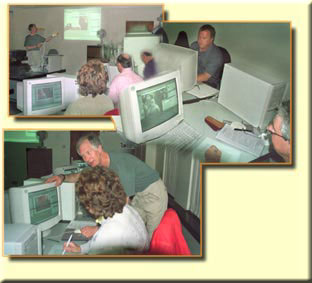
The Digital Imaging suite of equipment includes, for each student, a P.C. workstation complete with graphics tablet and colour monitor. A flatbed scanner is available, as too is an Epson printer.
For class demonstrations, the tutor uses a large screen high-resolution projector unit.
The environment is comfortable
and professional.